后来发现我真是图样图森破。ATC Audio 是能收到,但 AM 背景噪音比用手台接收还大,用各种方法都无法降低背景噪音。STT 转录文字的错误率高到出奇,简直就是瞎编,换了几十个 STT 提供方都没有什么进展。瞎折腾了一个月,在被劝退之前,我终于发现了根本原因:AI 只是编程工具,我自己对无线电知识了解还太匮乏,对民航空管的了解基本为零。这种情况下即使用 AI 写出了程序,也只是外行人照猫画虎搞出的垃圾。自以为很牛逼,只是被这种语言大模型 AI 吹捧出来的幻觉。
清醒之后,我才发现,除了基础知识匮乏外,我的硬件设备更是简陋。我当时竟然幻想着靠一根放在室内的杂牌车载天线和盗版 RSP1 SDR 就想完美接收航空频段,简直幼稚得可笑——这种配置甚至无法清晰地接收 FM 广播。随后我停止代码开发,开始恶补无线电知识和硬件采购与安装。
当时我突然想起弃坑很长时间的 ATC Audio 航空频段接收项目。此时 Anthropic 推出了代码能力空前强大的 Claude Opus 4.8 模型,我就将 ATC Audio 项目源码导入到 Claude 客户端中。Claude 果然不负众望,帮我接连实现了 AM 航空频段的完美降噪和高质量的 STT 文本生成,并且更进一步实现了:
其实没必要为这个项目找其存在意义,开发 Airspace Monitor 项目本身就充满了乐趣。与 Claude 配合开发时完全没有前 AI 时代那种孤立无援的挫败感,每天都能看到进展。并且项目最终完成并实现了高质量内容的持续产出和发布在社交媒体上,我看着每天涨粉也很开心,尤其是粉丝是全世界的飞行员和航空公司。
This project started with one small idea, listening to the airband, and then kept growing until it turned into a monster. The original plan was simple: run air traffic control audio through a speech-to-text model so I could practise my aviation English. Then I kept adding things: audio noise reduction, training my own STT models, ADS-B reception and decoding, showing radio signals on a web page, deploying to Cloudflare Workers, hooking up a long-zoom PTZ camera, designing and tuning the tracking algorithm, streaming live to YouTube, and automatically making short videos and posting them to Instagram, TikTok and other platforms. All of that together became what I now call Airspace Monitor, my amateur ATC tower.
I work in the security industry, and I've always been into radio, aviation and space. Long before AI came along I had a FlightAware ADS-B receiver set up, and I used a handheld radio to listen to the airband. But on their own, both were a bit boring. I could see aircraft on a screen, then look up at the sky and have no idea which plane was which. The ATC chatter on the handheld sounded very professional, but with the Australian accent I couldn't understand a word, and the AM background noise gave me a headache. That kind of frustration is why 99% of radio hobbyists eventually give up.
Then, from March 2025, AI changed everything.
First attempt: an illusion flattered into me by AI
Because I couldn't hear clearly or understand what was being said on the airband, I used Gemini 2.5 Pro in Cursor to write an SDR program in Rust, built specifically to receive the 120–135 MHz aviation band. Progress was fast at first. Within a week I had a first version that drove my RSP1 SDR, picked up signals, and sent the ATC audio to Google's speech-to-text API. I was so excited I thought I'd have perfect reception and transcription in another couple of days.
Too young, too simple, sometimes naive. Yes, I could receive the audio, but the AM background noise was even worse than on my handheld, and nothing I tried could bring it down. The transcription error rate was unbelievable. It was basically making things up, and I tried dozens of STT providers without getting anywhere. After a month of flailing around, right before I was ready to quit, I finally saw the real problem. AI is only a programming tool. My radio knowledge was far too thin, and I knew next to nothing about civil aviation or air traffic control. In that situation, even if AI writes the code for you, what you end up with is an amateur's imitation, and it's junk. I thought I was doing something amazing, but that was just an illusion the language model had flattered me into.
Once I woke up, I also realised that besides the missing knowledge, my hardware was pathetic. I'd honestly believed I could get perfect airband reception with a cheap no-name car antenna sitting indoors and a clone RSP1. Looking back, that was laughably naive. That setup couldn't even receive FM broadcast radio cleanly. So I stopped writing code and started cramming radio theory, buying equipment and installing it.
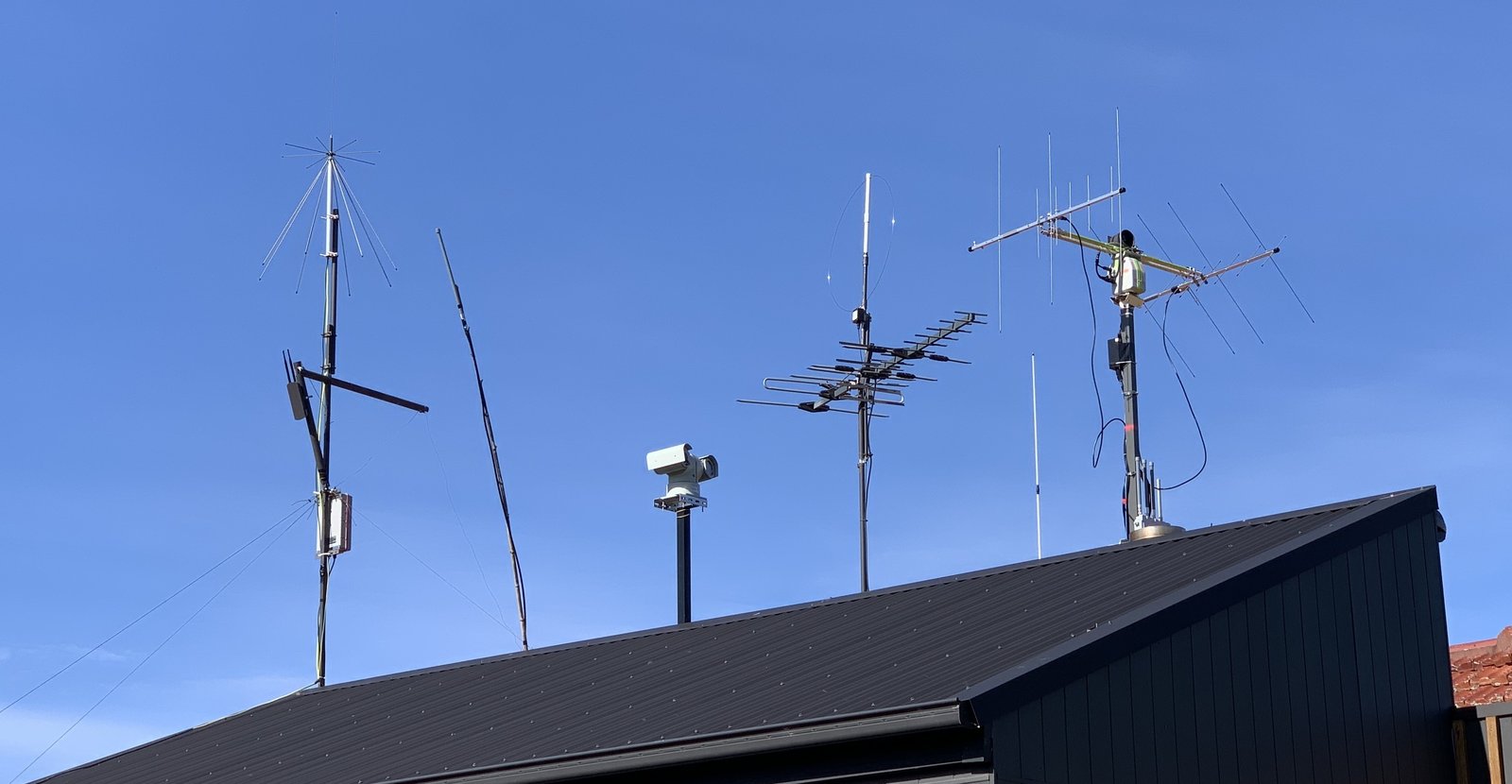
After more than a year of learning, buying and installing, I can only say I now have a basic understanding of radio and RF circuits. Along the way I learned basic PCB design and prototyping, how to solder, and how to get antennas covering everything from HF to microwave up onto my roof.
The antennas on my roof, from HF to microwave, plus the PTZ camera
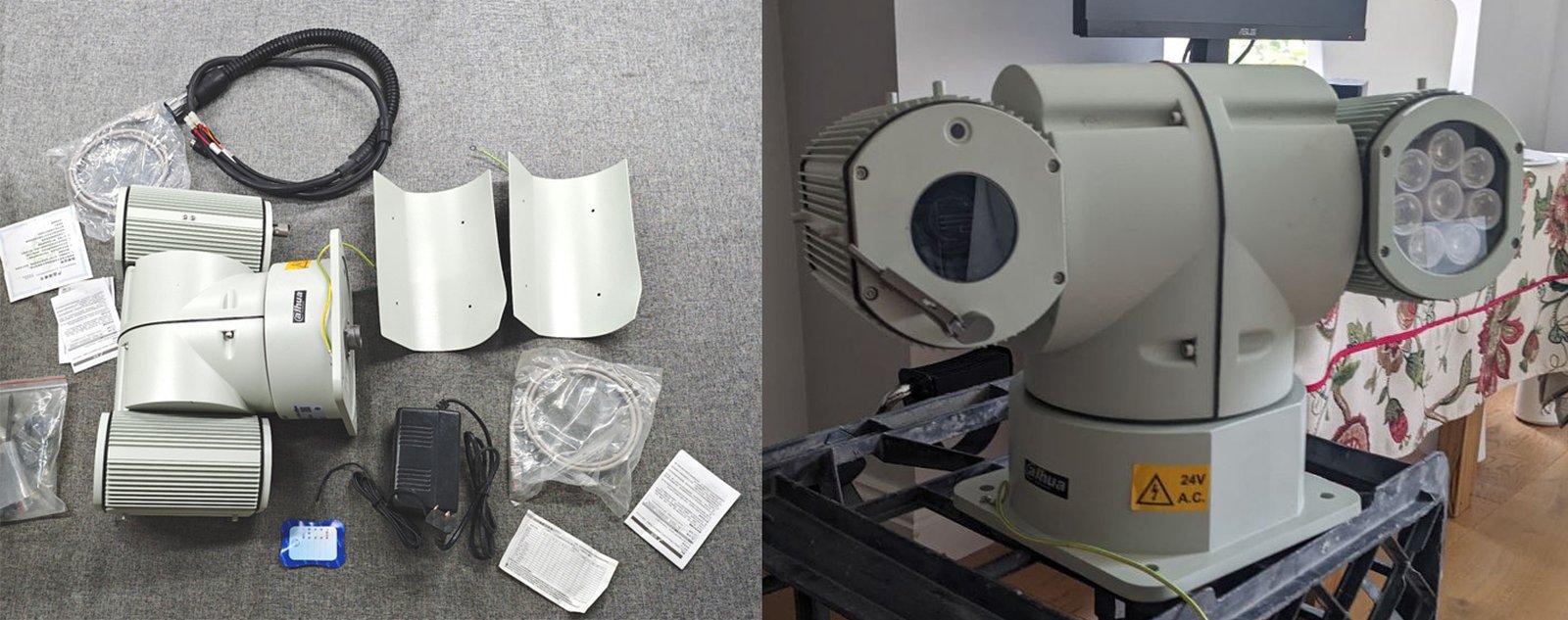
A 500 CNY Dahua PTZ camera
In May 2026, while browsing Xianyu (a Chinese second-hand marketplace), I came across a Dahua PTZ camera with 30x optical zoom for just 500 CNY (about AUD 120). I ordered it straight away and had it shipped to Australia by sea. More than two months later, this 13 kg Dahua camera finally turned up at my door, and after testing, everything worked perfectly.
That's when I suddenly remembered the airband project I'd abandoned so long ago. Around the same time, Anthropic released Claude Opus 4.8, with coding ability like nothing before it, so I loaded the old airband source code into the Claude app. Claude lived up to the hype. One after another, it helped me get near-perfect noise reduction on the AM airband and high-quality transcription. Then it went further:
a web page showing the live positions of aircraft on a map of all of Australia;
the cleaned-up ATC audio playing with karaoke-style subtitles that follow the transcribed words in real time;
under software control, the long-zoom PTZ camera points exactly where a chosen aircraft on the map is in the sky, zooms in and focuses precisely, and can follow aircraft continuously out to 50 km away.
At the heart of the control software are models I trained myself: the STT transcription model, the callsign recognition model, the zoom and focus model, and the audio noise reduction model. All of them are still being retrained and improved.
The 13 kg Dahua 30x optical zoom PTZ camera, shipped by sea from Xianyu to Australia
A few months ago this would have sounded like science fiction to me, and now I've actually built it with my own hands.
Airspace Monitor
I named it Airspace Monitor. I set up a YouTube live stream, Instagram, TikTok, Facebook, Twitter and a Telegram channel for it, and wrote software that streams the Airspace Monitor main screen live and automatically posts short aircraft videos with the tower audio and transcribed text.
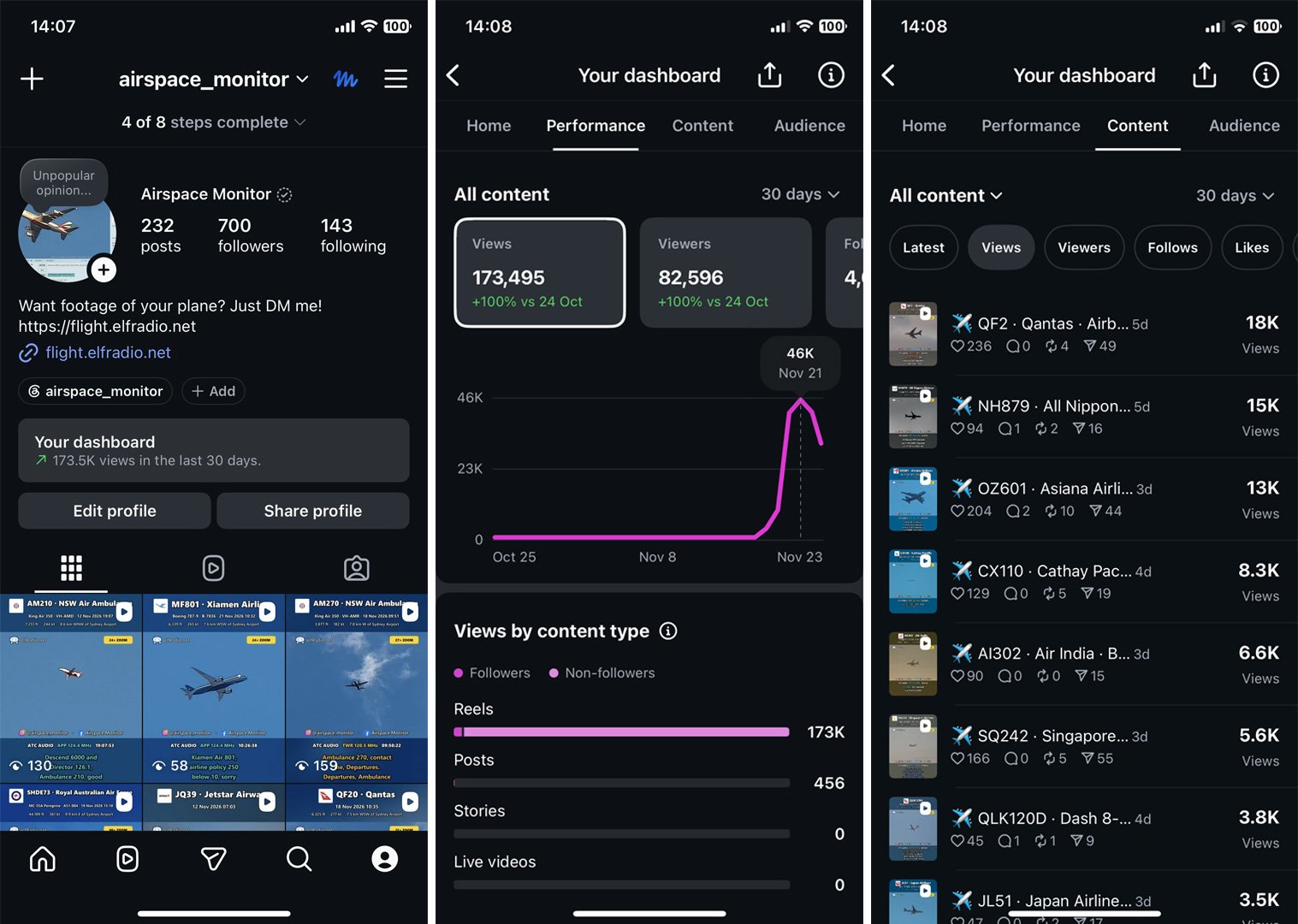
As of today, the Instagram account has 700 followers, total video views are over 170,000, and the most-watched single video has more than 18,000 views. The whole system runs fully automatically. It's deployed on my own computer at home and on Cloudflare Workers, there are no server costs, and the only running cost is electricity.
Airspace Monitor now does more or less everything an amateur ATC tower should do. In the future I might buy new antennas and SDRs, and a camera with longer zoom and higher resolution, to detect and identify drones and shoot better-quality video. Maybe one day it could help airlines and airports train staff in aviation English, or help the industry track and film aircraft during take-off and landing to improve safety, and so on.
But honestly, the project doesn't need a reason to exist. Building Airspace Monitor has been a lot of fun in itself. Working with AI coding, I never once felt the isolated, stuck-on-my-own frustration of the pre-AI days. I could see progress every single day. And in the end the project was finished and keeps producing quality content for social media. Watching the follower count go up every day makes me happy, especially knowing that the followers are pilots and airlines from all over the world.
Instagram @airspace_monitor: 700 followers, 173.5K views in 30 days
Below is the project information Claude helped me put together.
Every transmission is archived. Since October 2026 the recordings are being kept continuously, for at least 10 years.
Browse by date and hour, play back the noise-reduced recordings and read the transcripts.
Great for ear training, learning aviation English, or finding out exactly what a particular flight said to the controller.
2. 24/7 YouTube live stream
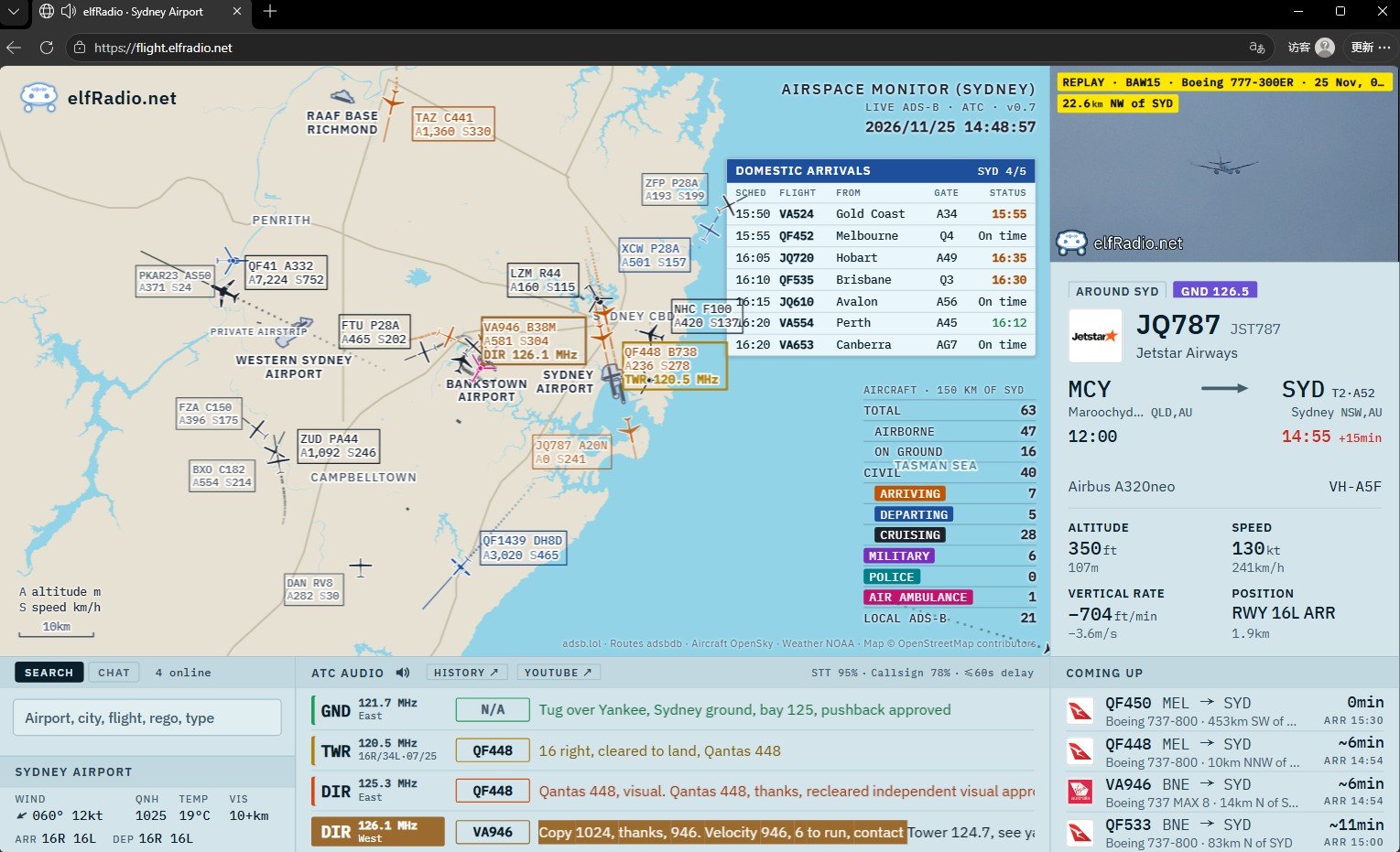
The camera feed is on the left. When an aircraft comes into view, the camera picks a target, swings onto it, sets the zoom by distance and follows it all the way.
Top right is a live map covering 150 km around Sydney Airport. Aircraft are drawn as silhouettes of their type and coloured by arrival / departure / overflight. Military, police, air ambulance and firefighting aircraft are marked separately.
On the right is the flight card: flight number, airline logo, aircraft type, registration, origin and destination, altitude, speed, and position relative to the airport.
Along the bottom runs the tower audio programme: four ATC frequencies (Tower, Ground, Approach, Departures) are received at once and played back one transmission at a time in order of importance. The transcript changes colour word by word as it's spoken, karaoke style, and shows which aircraft the call was for.
When the map is full screen it cycles through Sydney Airport's flight boards (domestic and international arrivals and departures), a "last 30 minutes" airspace summary written by an AI model every half hour, and traffic maps for NSW and all of Australia.
YouTube's unlimited automatic stream archiving means the ATC audio, aircraft positions and aircraft video are all kept permanently.
3. Interactive features on the Airspace Monitor website
Enter a flight number, callsign or registration to see where that aircraft is right now.
Click any aircraft on the map to bring up all of its ATC audio.
Smooth, stepless zoom on the map, with diagrams of every airport in Australia.
Live chat that every online viewer can see.
4. Automatic short video production and posting
Every successful track is automatically cut into a landscape and a vertical short. Each clip includes that aircraft's tower audio from the time, subtitles and flight information.
Clips are posted automatically to Instagram, Facebook, Threads, X, Bluesky and YouTube Shorts, and every clip goes to the Telegram channel.
Since 9 November it has produced 1,119 clips automatically, and the furthest aircraft filmed so far was 57 km away (ANZ104, 22 November).
5. Emergency monitoring
Sources: squawk codes 7700 / 7600 / 7500, keywords on frequency such as MAYDAY and PAN PAN, and the controller's response.
Emergencies are flagged automatically on the live stream with a red or amber banner, and that aircraft's radio calls are pinned to the top and played first.
6. My own STT, callsign recognition and audio noise reduction models
Tower transcription now runs on a high-performance local model that I trained myself on tens of thousands of locally recorded clips with human-checked text. It runs fine on a low-spec computer.
Callsign recognition is also a ranking model I trained myself, with no dependence on paid large language models.
The noise reduction model completely removes AM noise while keeping the voices clear, for crystal-clear audio, and it also runs on a low-spec computer.